

The Monitor Response Time vs Refresh Rate is an important term to understand.
What does refresh rate mean, and how does it affect gaming? I describe 60 to 144Hz monitors, and why more hertz isn’t always good.
Response Time
Table of Contents
- Range: 5 milliseconds or below
- Scale: Lower is better
- Sweet spot: 1 ms
Refresh Rate
- Range: 75 Hz or above
- Scale: Higher is better
- Sweet spot: 144 Hz
What Are Response Times and Refresh Rates?
If you are looking for a Cheap Gaming Monitor under 100$, then read our great reviews and buyer’s Guide here.
The difference between Response Rime And Refresh Rate
Response Time
 In short, it’s the amount of time a pixel needs, the smallest point a monitor can show, to change from one color or hue to another and then return to the original. It is measured in milliseconds, as is logical the smaller this number is better.
This time is important in general and essential if you are going to use the PC to play games or watching movies. If it is to work, it can get very tiring.
Also Read: TN vs IPS Panel which is good for Gaming
In any case, the effects are mainly subjective, they can bother some people more than others.
In old monitors you can even observe how moving objects provoke ghost images, that is, they leave as a trace.
Refresh Rate
The refresh rate of a monitor indicates the number of times per second that the screen image is updated. It is measured in hertz (Hz), a unit that indicates the frequency with which something occurs in a second. That is, if our monitor is 60 hertz, the image will be updated 60 times every second.
Simple, the higher the refresh rate the image will be softer and of better quality.
This is more than enough time to change the colors of the screen since the response time is less. Hertz are important for moving content, like movies. Games
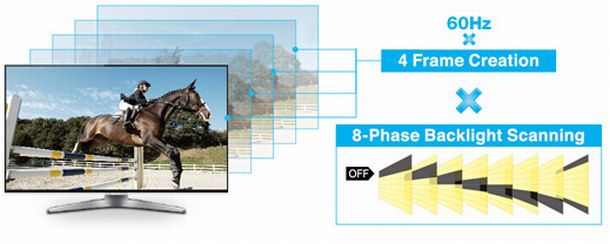
The higher the frequency of screen refresh, the less your monitor is prone to suffer from motion delay.
For example, if several objects move fast as in the case of games, the edges of the objects may be blurred. This happens when there is a mismatch between the image that is present on the screen and the one that is going to replace it.
Also Read: How to Setup Dual Monitor Screen
Refresh Rate vs Response Time | Differences | Watch Video
Motion Blur
No doubt the world of video games is the world of motion graphics, but the movement in a video game is not real but is a recreation or illusion that our brain interprets. Being a simulation, it is subject to limitations that developers have to perfect to simulate reality to the fullest.
The Motion in Reality
In real life, when anything moves from one place to another, it is clear that it travels the distance between its initial place and its final place, regardless of its speed. However, when a camera takes a photograph of a situation in which there are moving elements, it is presented as a strange effect in which it seems that these elements are in several places at once.
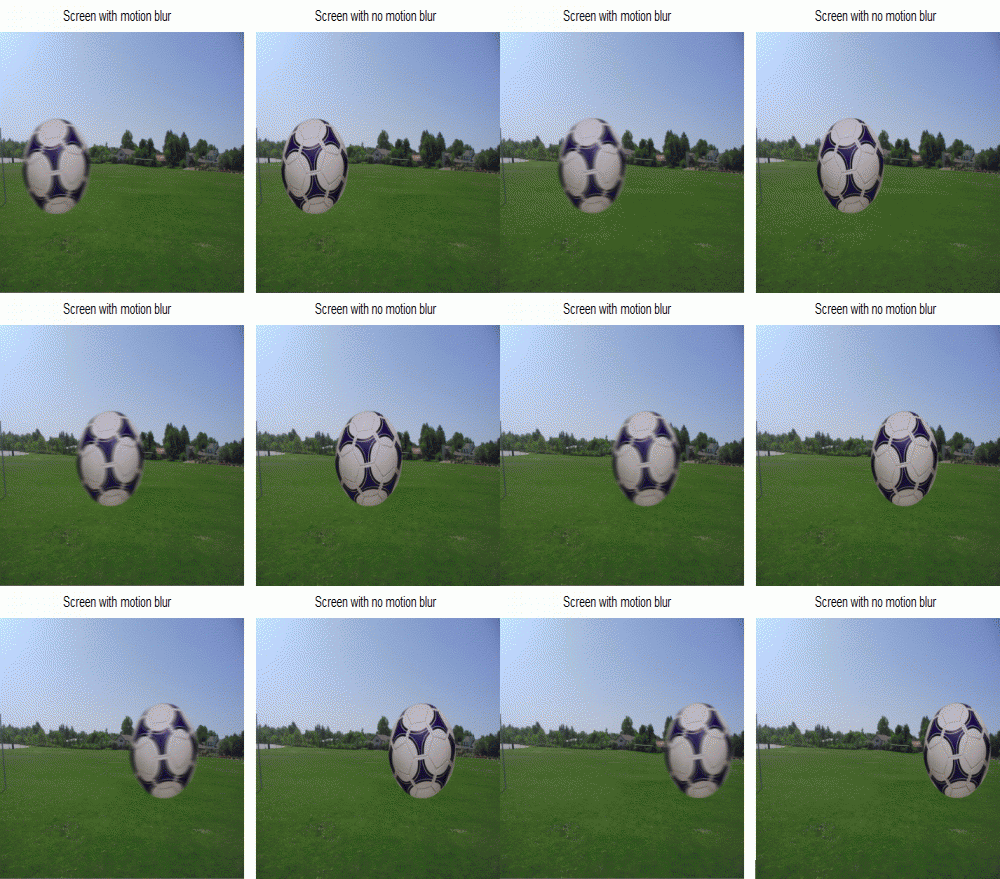
This effect is known as motion blur or movement trace.
This trail of movement is the proof that, no matter how fast something moves, in reality, it has to travel the whole way, if it did not happen then it would not be moved, but it would be teleportation, something that “still” is not possible.
Also Read: What is HDR Gaming
But what happens in video games?
The movement in video games
If you have ever created a video game, then you know that to move an element what we do is to modify its positions on the axis of coordinates in each frame:
Therefore, the more we increase the position between two frames, the more distance it seems to move:
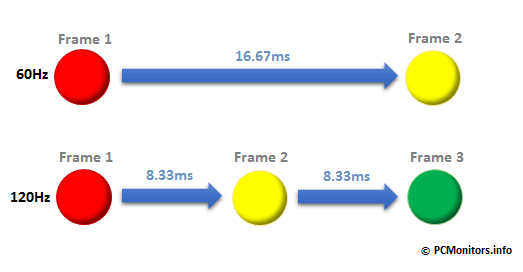
However, this has a small drawback, and that is that when we move an element in a video game it does not travel all the way between the positions of each frame, but we could say that it is jumping, or teleporting, and therefore there is no trace some of the movement beyond that of the multiple positions of the position increase.
When this movement is based on small distances there is no problem because it simulates reality well (less speed, more frames), but if we move an element a lot of distance in each frame then we will notice the jumps on the screen (more speed, fewer frames) ), and we must not forget that for a fluid recreation we recommend at least 24 frames per second.
Also Read: Best Monitor For Eye Strain
Motion blur in video games
Anyway, as I said at the beginning, that this phenomenon does not exist as something natural does not mean that it can not be recreated in video games to soften the movement of its elements. In fact, it is quite the opposite and it is used quite often.
Also Read: Best Monitor for gaming Under $200
Recreating the movement trail in video games can be implemented in many ways but one that is simple is to “clone” the moving graphics several times in the opposite direction to the one that moves and subtract opacity until it disappears.
You may also be interested: Best Monitor for Programmers
Input Lag
The input lag of a monitor is the time that passes since the image is generated from a source (Blu-ray, console, etc.) until the image appears on the screen.
The input lag is very important when playing video games since the time that passes from you give a button on the remote until you see it reflected on television should be the least possible. But, in fact, in that case, we would have several lag inputs: the command and the screen.

When is the input lag important
Input lag means entry delay and, therefore, is only important when interacting with the screen. Which is translated in most cases, when we are going to play video games on the console or on the computer. Otherwise, you should not worry about the input lag.
And even then, it’s more important in fast games like first-person games (fps shooters), fighting games, etc. Basically, games in which reflexes are important. A low input lag can make the difference between killing or being killed, between scoring a goal or failing it, etc
The reference values that we have to fix are the following:
- Playing with an input lag of more than 100 ms is practically unplayable
- Most people will not notice an input lag of less than 50 ms (milliseconds)
- If you are demanding you should have a television with less than 40 ms of input lag.
As we can see, on the LCD monitor the counters are more delayed, this is because it has more input lag. And although both have been sent the same image, the LCD takes more time to display it on the screen.

Can you trust the data given by the manufacturer in terms of response times?
Unfortunately, you can’t trust the data that the manufacturer gives you, at least not to compare them with others since they usually give the number that suits them without detailing what they refer to and how it has been measured.
Also Read: Best Monitor of 1440p
To mess up a bit more, several measures are often used when talking about response time. One would be the passage from black to white and black again, the other step from gray to gray. Although it is named like this, it is not really the passage from one gray to another, but because of how an LCD monitor works, it refers to the passage of shade from one color to another.
Also Read: How to Play 4K Videos on PC
The step from gray to gray can be seen in the specifications as GTG or G2G. The step from black to white is usually smaller and is what you usually give the manufacturers.
The return to color does not have to take the same as going to that color, it is not symmetrical. Therefore the best strategy at the time of purchase is to be able to try it before buying it, see it in-store, and with the programs that you are going to use if possible.
The response time depends a lot on the type of LCD panel that the monitor is using either TN, VA, or IPS.
Response Time vs Refresh Rate | FAQs
Conclusion
Well, This was all about “Response Time vs Refresh Rate“


yo, its very great article on response time & refresh rate, keep posting stuff
The lower response time and higher refresh rate is always better
A further issue is that video gaming became one of the all-time greatest forms of excitement for people of any age. Kids participate in video games, plus adults do, too. Your XBox 360 is probably the favorite video games systems for those who love to have hundreds of activities available to them, and also who like to experiment with live with others all over the world. Thank you for sharing your thinking.